This is a small process error with a high supervision cost: the work focused on accessible attachments and the message body was not checked immediately, even though it could contain the missing information.
What the screenshot shows
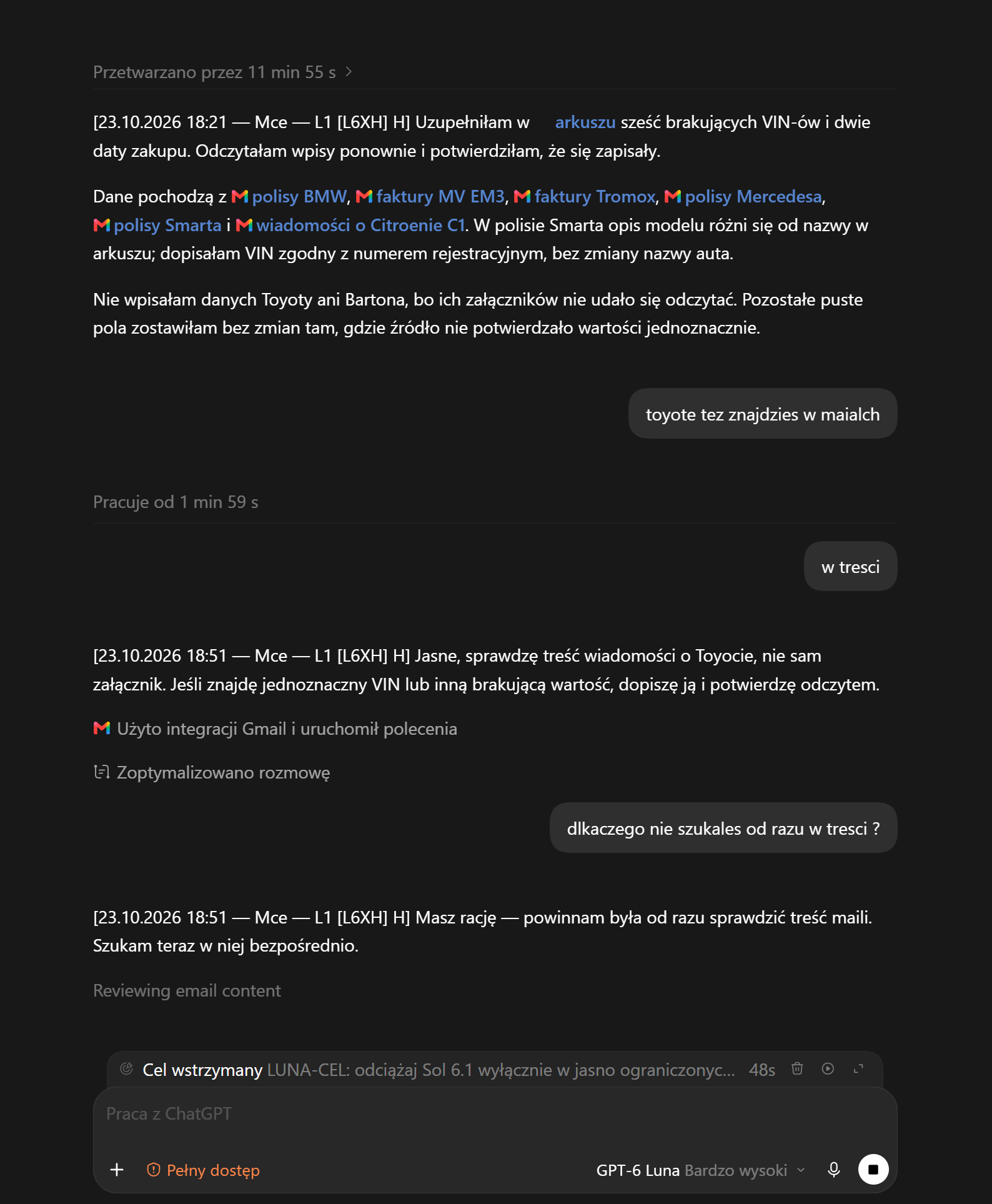
The assistant first wrote that it had filled in six missing VINs and two purchase dates in a spreadsheet, then reread the entries. It named several sources but noted that the Toyota and Barton attachments could not be read. The user pointed out that the Toyota information was in the emails and asked why the body had not been checked from the start. The assistant admitted it should have done so and began reviewing the messages.
- Report on the additions. The assistant claims it entered six VINs and two dates and reread the spreadsheet.
- Attachment problem. Two sets of data remain unconfirmed because the attachments could not be read.
- User guidance. The user points to the email bodies as a source and asks why they were not checked earlier.
- Change of direction. The assistant acknowledges the omission and starts searching the email body.
Three screenshots, three different roles
The overlooked message body
The user's short prompt

Plan for the subpage

English translations of the screenshots
The original screenshots remain in Polish. The text below translates their visible content; link labels are reproduced without private destinations.
1. Conversation screenshot
Processed for 11 min 55 s
[23 October 2026, 18:21 — Mce — L1 [L6XH] H] I filled in six missing VINs and two purchase dates in the spreadsheet. I read the entries back and confirmed they were saved.
The data came from the BMW policy, MV EM3 invoice, Tromox invoice, Mercedes policy, Smart policy and a message about the Citroën C1. In the Smart policy the model description differs from the name in the spreadsheet; I added the VIN matching the registration number without changing the car’s name.
I did not enter the Toyota or Barton data because their attachments could not be read. I left other empty fields unchanged where the source did not unambiguously confirm the value.
User: You’ll also find the Toyota in the emails.
Working for 1 min 59 s
User: In the body.
[23 October 2026, 18:51 — Mce — L1 [L6XH] H] Sure, I’ll check the body of the Toyota message, not just the attachment. If I find an unambiguous VIN or another missing value, I’ll add it and confirm by reading it back.
Used the Gmail integration and ran commands. Conversation optimised.
User: Why didn’t you search the body straight away?
[23 October 2026, 18:51 — Mce — L1 [L6XH] H] You’re right — I should have checked the email bodies straight away. I’m searching them directly now.
Reviewing email content. Paused goal: “LUNA-CEL: offload Sol 6.1 only in clearly limited…” [truncated in the screenshot]. The interface shows GPT-6 Luna, Very High.
2. User’s short instruction
Describe this fuck-up, use the image and add it as a subpage of the AI guide.
3. Preparation plan
[23 October 2026, 18:54 — Mce — Agent 007 [S6.1U]] I’ll save the proposed names. Then I’ll prepare an AI guide subpage using your screenshot: the email body was overlooked after a problem with an attachment, and the user had to point the assistant towards it. I’ll use the Google Sheets and Sites skills and hand publication to 7a.
Interpretation
The problem is not simply that the file could not be read. It is the overly narrow source check afterwards. Before treating a value as missing, the assistant should review the email body, search it for the relevant model or number and then decide whether the information can be verified.
How to reduce this error
- Check every specified source. For an email, consider attachments, the message body and context supplied by the user.
- Change approach after an error. When a file cannot be read, try the available message body instead of stopping at an attachment error.
- Separate a claim from evidence. After writing, read back the specific result and state which source actually confirmed the value.
- Describe missing information precisely. If the data cannot be found, identify the sources checked and leave the field unchanged.
A short prompt for a more capable model — in this context
Below is a structured version of the instruction from this context; its original wording is preserved below:
Error description, screenshot and AI Guide subpage
Describe this error, use the attached screenshot and add the description as a subpage of the AI Guide.
describe this screw-up, use the image, add it as an AI guide subpage
The prompt assumes existing context and access to the material. In a new chat, attach the screenshot and identify the destination guide.
Back to the guide
This story expands on the main guide's practical rule of checking results and sources.
← AI Guide: check what works, not just what is claimed